Address cleaning with n8n and Gemma3
I got to work on an address data, the problem is the data is collected in a same column.
for example:
| Name | Address |
|---|---|
| John | 230/231 Moo 9 |
| Bake | 333,334 Vivaldi Tower |
As seen, the data is in natural language.
And in order to use these data for tax related or documents purpose, I must clean this data in a better format.
Which would look like this:
| Name | Building | Number | Moo |
|---|---|---|---|
| John | 230/231 | 9 | |
| Bake | Vivaldi Tower | 333,334 |
In order to do that I decided to work with n8n to clean this data with Gemma3 12b from Google API.
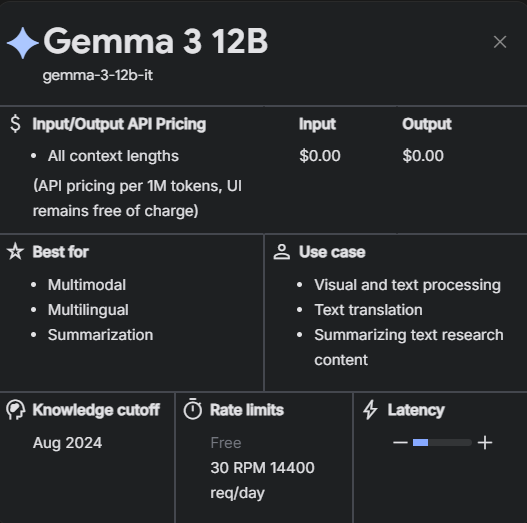
As you can see, it is free with a huge rate limits (30 request per minute, 14k request per day) which is good for me because I'm working data with over 9,000 rows.
The problem lies in the model. While Google stated that Gemma3 is capable of tool-use, it's API is not. But I have to work with what I have here, so output-parser and system prompt is out of the way.
I did looked into this, and found a way to prompt the AI to work.


So I add a user prompt like this in n8n as said in the documents.
Create a JSON object from the given address data.
You must return your answer strictly in the form of a JSON object matching the following schema:

{
  "type": "object",
  "properties": {
    "building_name": {
      "type": "string"
    },
    "room_number": {
      "type": "string"
    },
    "floor": {
      "type": "string"
    },
    "village": {
      "type": "string"
    },
    "house_number": {
      "type": "string"
    },
    "moo": {
      "type": "string"
    },
    "alley": {
      "type": "string"
    },
    "intersection": {
      "type": "string"
    },
    "road": {
      "type": "string"
    },
    "subdistrict": {
      "type": "string"
    },
    "district": {
      "type": "string"
    },
    "province": {
      "type": "string"
    },
    "postal_code": {
      "type": "string"
    },
    "country": {
      "type": "string"
    }
  },
  "required": [
    "building_name",
    "room_number",
    "floor",
    "village",
    "house_number",
    "moo",
    "alley",
    "intersection",
    "road",
    "subdistrict",
    "district",
    "province",
    "postal_code",
    "country"
  ],
}

Beware! number with special chracters are house number.

Always use upperletter and english in country.

If you don't know the country, just pust it as "THAILAND"

Address: {{ $json.ADD }} {{ $json.ZIP }}

{{(() => {
    let raw = $json.output;

    // Handle string input by removing markdown and parsing JSON
    if (typeof raw === 'string') {
        raw = raw
            .replace(/^\s*```json/i, '')
            .replace(/```$/i, '')
            .trim();
        try { raw = JSON.parse(raw); }
        catch { return { error: 'invalid_json' }; }
    }

    // Check required keys from the address schema
    const requiredKeys = [
        'building_name',
        'room_number',
        'floor',
        'village',
        'house_number',
        'moo',
        'alley',
        'intersection',
        'road',
        'subdistrict',
        'district',
        'province',
        'postal_code',
        'country'
    ];

    // Validate presence of required keys
    for (const key of requiredKeys) {
        if (!(key in raw)) {
            return { error: 'missing_key', key };
        }
    }

    // Convert null values to empty strings and type check
    for (const key of requiredKeys) {
        if (raw[key] === null) {
            raw[key] = '';
        }
        if (typeof raw[key] !== 'string') {
            return { error: 'invalid_type', key, expected: 'string' };
        }
    }

    // If all checks pass, return the parsed and formatted JSON
    return JSON.stringify(raw, null, 2);
})();}}
By define the answer as JSON schema, we don't need output-parser anymore but while the answer is in JSON schema, it's still in text format. So we need to add another node to convert this text into JSON object for n8n.
{{(() => {
    let raw = $json.output;

    // Handle string input by removing markdown and parsing JSON
    if (typeof raw === 'string') {
        raw = raw
            .replace(/^\s*```json/i, '')
            .replace(/```$/i, '')
            .trim();
        try { raw = JSON.parse(raw); }
        catch { return { error: 'invalid_json' }; }
    }

    // Check required keys from the address schema
    const requiredKeys = [
        'building_name',
        'room_number',
        'floor',
        'village',
        'house_number',
        'moo',
        'alley',
        'intersection',
        'road',
        'subdistrict',
        'district',
        'province',
        'postal_code',
        'country'
    ];

    // Validate presence of required keys
    for (const key of requiredKeys) {
        if (!(key in raw)) {
            return { error: 'missing_key', key };
        }
    }

    // Convert null values to empty strings and type check
    for (const key of requiredKeys) {
        if (raw[key] === null) {
            raw[key] = '';
        }
        if (typeof raw[key] !== 'string') {
            return { error: 'invalid_type', key, expected: 'string' };
        }
    }

    // If all checks pass, return the parsed and formatted JSON
    return JSON.stringify(raw, null, 2);
})();}}
As you can see this node here would receive the text output from AI, and convert it in to JSON object. In n8n it would look like this
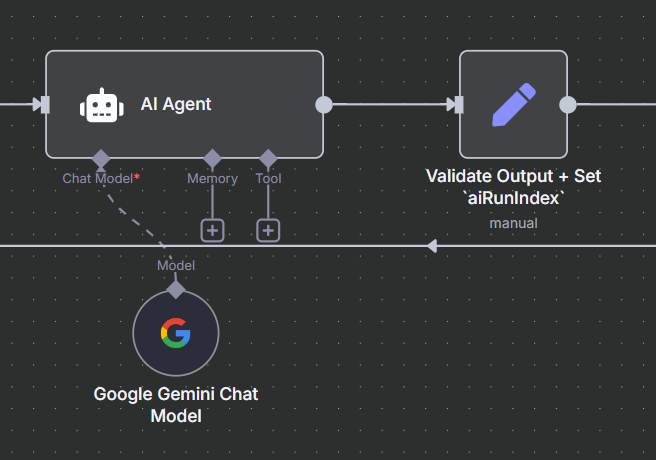
After this I just switch this workflow into active, and let's it run for two days and write data back into CSV file.